Order and Invoice Workflow Project · 2026

I built the same workflow
three different ways.
here's what I learned

Invoice and order processing is one of those tasks that sounds simple until you actually sit with it. I wanted to understand how n8n, Make, and Zapier each handle the same real-world problem, not just in theory, but by building every node and making them actually work. These are the results.

Invoice workflow

Someone emails you an invoice. The attachment is automatically saved to cloud storage, the key details (vendor, amount, due date) are extracted and logged to a spreadsheet, then a notification email is sent to your accounting team.

Order workflow

A customer emails an order. The details are automatically extracted and logged to a spreadsheet, then a confirmation email is sent back to the customer.

n8n Make.com Zapier

n8n

Invoice processing

Self-hosted · Gmail → Google Drive → AI extraction → Sheets → Confirmation email

Because it's self-hostable and open source, n8n gives you full visibility into what's happening at every node. I built this workflow twice: first as a multi-step version that separates file extraction and AI reasoning into distinct nodes, then a second pass to see if I could simplify it.


Version A Original, 9 nodes
n8n canvas n8n original 9-node workflow
Step by step
T
Trigger
Gmail Trigger
Fires when a new email arrives in the watched inbox.
2
Storage
Upload file → Google Drive
Saves the attachment to Drive before any processing. A durable copy regardless of what happens next.
3
Action
Download file
Re-fetches the stored file back into the active workflow data stream.
4
Action
Extract from File
Pulls raw text from the PDF so the AI node receives readable content rather than binary data.
5
AI
Message a model — extract fields
Sends extracted text with a structured prompt. Returns invoice data in a consistent, mappable format.
6
Transform
Edit Fields
Maps AI output to the exact column structure the spreadsheet expects.
7
Output
Append row in sheet
Writes structured invoice data to the Google Sheets log.
8
AI
Message a model — draft reply
Uses the extracted invoice details to compose a notification email for the accounting team.
9
Output
Send a message — Gmail
Sends a notification email to the accounting team with the extracted invoice details.
Version B Simplified, 8 nodes
n8n canvas · simplified n8n simplified workflow using Analyze Document node
What changed
T
Trigger
Gmail Trigger
Same entry point as Version A.
2
Storage
Upload file → Google Drive
Saves the attachment to Drive before any processing. A durable copy regardless of what happens next.
3
Action
Download file
Re-fetches the stored file back into the active workflow data stream.
4
AI · combined
Analyze Document
Replaces both "Extract from File" and "Message a model" in a single node. Handles document reading and AI extraction together. Fewer failure points, simpler canvas.
5
Transform
Edit Fields
Manually maps each extracted field to the correct spreadsheet column.
6
Output
Append row in sheet
Same sheet structure as Version A, no rebuild required.
7
AI
Message a model — draft reply
8
Output
Send a message — Gmail

Version B came from a simple question: is there a way to simplify this? The Analyze Document node turned out to be the answer: it reads the document and runs AI extraction natively, removing the need for a separate Extract from File step and keeping the canvas cleaner.

- After revisiting the workflow, sending a confirmation back to the original sender is also possible by adding an additional Send Email node at the end.
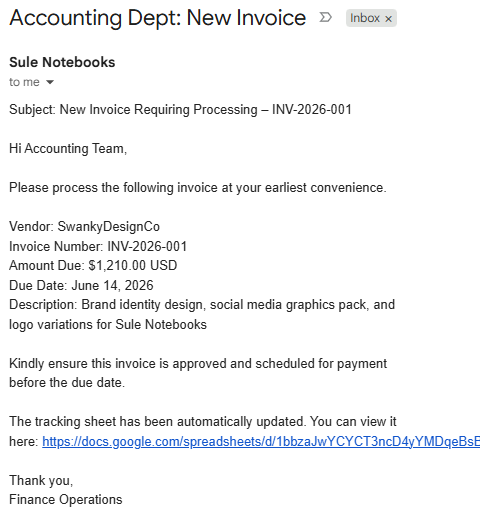

Result — confirmation email
n8n output AI-generated invoice confirmation email from n8n workflow

Make.com

Two scenarios, one problem

Visual flow builder · Gmail · Dropbox · Anthropic · Google Sheets

Make's visual interface looked more intuitive, so I wanted to see how it handled both workflows. I built two scenarios: one that processes incoming order emails directly, and one that routes invoice attachments through Dropbox for storage before processing.

Scenario 1: Order email direct
Make scenario canvas Make.com order email processing scenario with Gmail, Anthropic, JSON, Sheets, Gmail
Modules
T
Trigger
Watch emails — Gmail
Scheduled polling for incoming order emails.
2
AI
Send message — Anthropic
Passes email body and attachment to Claude for structured data extraction.
3
Transform
Parse JSON
Converts the AI's text response into structured data Make can map to sheet columns.
4
Output
Add a row — Google Sheets
Logs the parsed order data to the tracking sheet.
5
AI
Send message — Anthropic
Second AI call drafts a confirmation reply using the extracted order details.
6
Output
Send an email — Gmail
Delivers the AI-written confirmation to the original sender.
Scenario 2: Via Dropbox
Make scenario canvas · Dropbox variant Make.com Dropbox invoice processing scenario with 9 modules
Modules
T
Trigger
Watch emails — Gmail
Same scheduled watch, but this scenario routes files through Dropbox first.
2
Action
Get attachment — Gmail
Isolates the attachment binary for storage.
3
Storage
Upload file — Dropbox
4
Storage
Get file link — Dropbox
5
Storage
Download file — Dropbox
Re-fetches the stored file into the active workflow for AI processing.
6
Transform
Data processing
Prepares file content for the AI module.
7
Output
Add a row — Google Sheets
8
AI
Send message — Anthropic
9
Output
Send an email — Gmail

Make's canvas-based interface is visually polished and easy to navigate. But Make didn't have a built-in way to parse a PDF from Dropbox and push the data cleanly into Sheets, so the Dropbox variant ended up getting rebuilt in Zapier, which has been around longer and has more mature integrations for exactly this kind of document-handling workflow. n8n and Zapier ended up being the better fit for the PDF extraction use case.


Zapier

The no-code baseline

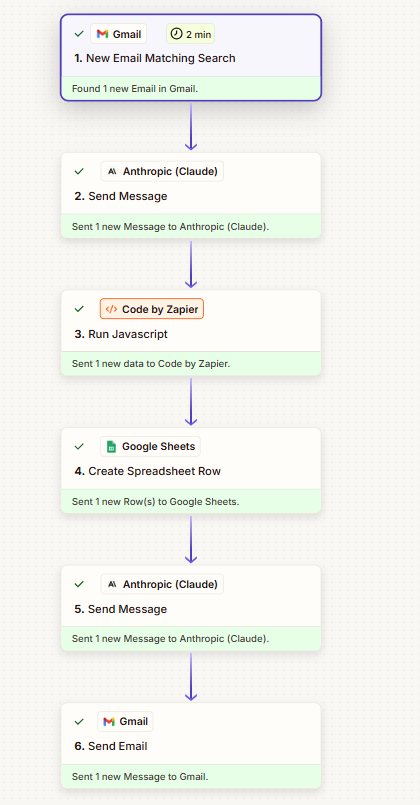
Gmail · Anthropic (Claude) · Code by Zapier · Google Sheets · Gmail

Zapier was where I started, and I'd recommend it as a starting point for workflows like this. I actually found Make's interface more visually intuitive, but Zapier's library of integrations is significantly larger, and for document processing specifically that matters. Zapier has native PDF extraction built in, deep Gmail and Google Drive integration, and a large enough ecosystem that you're unlikely to hit a wall when you need to connect something new. Make is catching up, but when you need to extract structured data from a PDF attached to an email and route it somewhere useful, Zapier's longer track record shows. It's also the platform most likely to have a pre-built integration for whatever tool a client is already using, which in practice means less custom work to get a workflow running.

Zapier workflow Zapier order processing workflow: Gmail, Anthropic Claude, Code by Zapier, Google Sheets, Anthropic Claude, Gmail
Zap steps
T
Trigger
New email matching search — Gmail
Watches the inbox and fires when a new email matches the search criteria.
2
AI
Send message — Anthropic (Claude)
Passes the email to Claude with a structured prompt to extract order details.
3
Transform
Run JavaScript — Code by Zapier
Parses and formats Claude's response into clean, structured data ready for the spreadsheet.
4
Output
Create spreadsheet row — Google Sheets
Logs the structured order data as a new row in the tracking sheet.
5
AI
Send message — Anthropic (Claude)
Second Claude call drafts a confirmation email using the extracted order details.
6
Output
Send email — Gmail
Delivers the AI-written confirmation back to the original sender.